
DSH Mesh
把几台电脑连起来,互相派活。
每台都装上,它们自己就找到了彼此 —— 不用配对码、不用填 IP、不用装 Tailscale。
Connect your DSH machines. Let them hand work to each other.
Install on each one and they find each other — no pairing codes, no IP addresses, no Tailscale client.
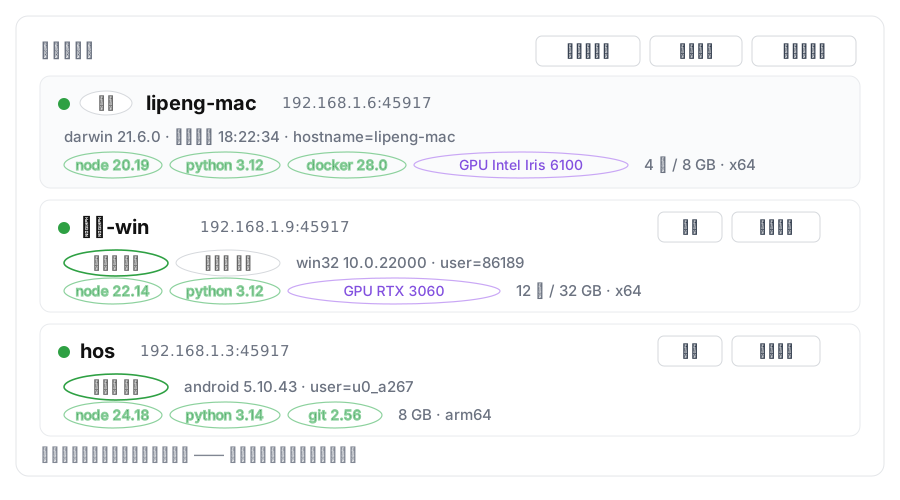
把几台电脑连起来,互相派活。
每台都装上,它们自己就找到了彼此 —— 不用配对码、不用填 IP、不用装 Tailscale。
Connect your DSH machines. Let them hand work to each other.
Install on each one and they find each other — no pairing codes, no IP addresses, no Tailscale client.
dsh plugin add dsh-plugin-meshdesktop profile 要在 DSH 自带终端里跑;其它 profile 用普通终端即可。
插件在启动时加载,装完必须重启一次。
看到别的机器就是成功了。看不到就看下面的排查。
dsh plugin add dsh-plugin-meshThe desktop profile needs DSH's own terminal; other profiles work from a normal one.
Plugins load at startup, so restart once.
Seeing another machine means it worked. If not, check troubleshooting.
45917 和 UDP 45892?45917 的人都能给你派活。在咖啡厅、宿舍这类网络,打开 Mesh 页面「配对码」里的开关,再把两台机器的码对成同一个就行。45917 and UDP 45892?45917 can send you work. On café or dorm networks, flip the switch in the Mesh panel's “pairing” card and make both machines share one code.